Want to download Roblox without any hassle? Find out where to install the game and how to start playing.
Ad
Roblox is a global platform where millions of people gather every day to imagine, create, and share experiences in immersive, user-generated 3D worlds.
With a constantly growing library of games, there’s always something new to discover, making it a favorite for players of all ages.
The post today will show you exactly how to complete the Roblox download on your device and join the fun.
What You Can Find Inside the Roblox App
Before we get to the download process, let’s talk about what makes Roblox so special. It’s not just a single game but a massive collection of experiences.
Think of it as a digital playground where you have the freedom to be anyone and do anything.
Here is a brief overview of what you can find inside Roblox:
Play Millions of Games
Jump into everything from high-speed racing games and complex role-playing adventures to simple obstacle courses, known as “obbies”.
Create Your own Experiences
If you have an idea for a game, you can use Roblox Studio, a powerful and free tool, to bring your vision to life and share it with the world.
Customize Your Avatar
Express your personality by creating a unique digital identity. You can change your clothes, accessories, and animations to stand out.
Socialize with Friends
Connect with friends and meet new people from around the globe. You can chat, play games together, and collaborate on creative projects.
With so much to do, it’s easy to see why so many people are eager to get started.
How to Download Roblox on Different Devices
Getting Roblox is a straightforward process, no matter what device you use.
The platform is designed to be accessible, whether you’re at home on your computer or on the go with your phone.
For Mobile (Android or iPhone)
For the best experience, make sure you are connected to a stable Wi-Fi network before starting the Roblox download to avoid using up your mobile data.
On Android:
Open the Google Play Store: Tap the Play Store icon on your home screen or in your app drawer.
Search for Roblox: Use the search bar at the top and type in “Roblox”.
Install the App: Tap the “Install” button and wait for the download to finish.
Open and Play: You can open the app directly from the Play Store or find its icon on your home screen.
On iPhone (iOS):
Open the App Store: Find and tap the blue App Store icon on your device.
Search for Roblox: Type “Roblox” into the search bar.
Download the App: Tap “Get” and use your device password to start the download.
Launch the Game: After the download, select the app to get started.
For Computer (Windows or Mac)
Playing on a computer offers a different experience, often with more precise controls thanks to the keyboard and mouse.
On Windows:
Go to the Roblox Website: Open your web browser and navigate to www.roblox.com.
Sign Up or Log In: Create a new account or log into your existing one.
Choose a Game: Find any game on the homepage that looks interesting and select the green “Play” button.
Download the Installer: A window will appear, then confirm the installation of the “Roblox Player.”
Run the Installer: Find the Roblox download file in your “Downloads” folder and double-click it.
Start Playing: Once finished, you can return to the website, click any “Play” button, and the game will launch.
On Mac:
Visit the Roblox Website: Open Safari or another browser and go to the official Roblox site.
Log In or Sign Up: Enter your account details or create a new one.
Select an Experience: Click the “Play” button on any game you wish to try.
Download the File: You will be prompted to download an installer file called “Roblox.dmg.”
Install the Application: Open the file in your “Downloads” folder and drag it to the “Applications” folder.
Launch and Play: You can launch Roblox from your Applications folder or by returning to the website and clicking “Play” on a game.
How to Start Playing After Downloading Roblox
Once Roblox is installed, launching the app or logging in on the website will take you to the main hub. This is your gateway to every experience on the platform.
At first, it might seem like a lot, but navigating is very intuitive. The “Home” page shows you games that are recommended for you, popular experiences, and what your friends have been playing.
You can use the search bar at the top to look for specific games or genres.
The left-hand menu gives you access to other key areas, such as the “Avatar” shop, your “Profile”, and your “Friends” list.
To jump into a game, simply touch on its icon and then hit the big green “Play” button.
The game will load, and you’ll be instantly transported into that world, ready for your next adventure.
Tips to Customize Your Avatar on the Platform
After you’ve played a few games, you’ll probably want to personalize your character.
Your avatar is your digital representation in the Roblox universe, and customizing it is a huge part of the fun.
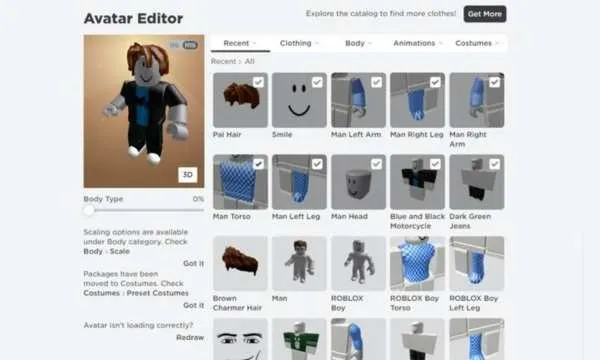
The Avatar Editor is where all the magic happens. You can access it via the menu on the left side of the screen. Here are some tips to get started:
The Avatar Shop is filled with millions of items, use the filters to search for free items to start your collection without spending anything.
Don’t be afraid to experiment! Combine different shirts, pants, hats, and accessories to create a look that’s uniquely yours.
You can adjust your avatar’s body shape, scale, and even equip different animations for walking, running, and jumping.
The shop offers pre-made character bundles that give you a complete look with just one click.
Customizing your avatar is an ongoing process. As you discover new games and items, your style can evolve.
Main Types of Games Available on Roblox
One of the best things about Roblox is the sheer variety of games available.
There’s truly something for every type of player, whether you’re looking for competition, creativity, or just a place to hang out with friends.
Role-Playing Games (RPGs)
These games let you take on a specific role, like a citizen in a bustling city, a student at a magical school, or even a pet owner.
They are heavily focused on social interaction and storytelling.
Tycoons
In tycoon games, the goal is to build a business or empire from the ground up.
You might manage a theme park, a restaurant, or a factory, making strategic decisions to grow your wealth.
Obbies (Obstacle Courses)
These games test your platforming skills as you navigate through challenging obstacle courses.
They are great for players who enjoy a fun, skill-based challenge.
Simulators
Simulator games mimic real-world activities in a fun and exaggerated way.
You can experience anything from being a farmer or a pilot to… well, almost anything you can imagine!
Action and Adventure
This broad category includes everything from survival games where you have to gather resources and fend off dangers to epic adventure games with quests and mysteries to solve.
No matter your preference, you’re sure to find a game that captures your imagination.
What Type of User Is Roblox Recommended For?
Roblox is designed for a wide audience, but it is particularly popular with children and teenagers. Its focus on creativity, community, and play makes it an engaging and social environment.
The simple graphics ensure it runs well on a variety of devices, making it accessible to users who may not have high-end gaming hardware.
However, the platform is not limited to younger players. Many adults enjoy Roblox for its game development tools, social features, and the sheer creativity on display.
It’s a great platform for anyone who enjoys user-generated content and wants a gaming experience that is constantly evolving.
The company also provides a range of parental controls, allowing parents to manage their child’s interactions and access to content, ensuring a safer experience for everyone.